
f
Navigation through the portal texts chaesv.com
When various warnings appear, and also interrupting the download, when following hyperlinks, long loading times, don't pay attention, these are the machinations of IT D and their patrons.
admin. CHAESV
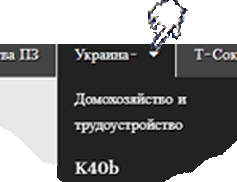 |
If the button name or page name ends with a ∇ – when you hover over them, an image of a hand appears, that is, a link to information, To go to the information, you need to right-click in the drop-down window, move the cursor to open in a new tab and click on it, or continue to move the cursor along the directory tree, , without pressing the right mouse button the name without the ∇ sign at the end when hovering over which the image of a hand appears – click to be redirected to information . |
StartL onili |
Words in the text highlighted in a different color when you hover over them, an image of a hand appears, have a link to additional information, To view it click on this link. |
 |
To return back to the test from which the hyperlink was made, click the arrow in the upper left corner of the browser or press Alt+<, in the lower right corner on the keyboard. By pressing the browser arrows or key arrows, you can navigate through all transitions in two directions from their beginning to the end and in the opposite direction |
ffff
Publication author

9 comments for “About portal navigation”